
Best Pay as You Go Wifi Router of 2026
best pay as you go wifi router options for flexible home or travel use. Compare modem needs, Wi-Fi bands, wired ports and setup details before buying in November 2026.
 By Sofia Vasquez
Updated November 19, 2026

A router doesn’t provide internet service by itself, so a pay-as-you-go plan and a Wi-Fi router are separate buying decisions. The Best Pay As You Go Wifi Router options here include both home routers and portable travel models, and they aren’t interchangeable. Some connect to an existing modem, while travel routers can share a public or wired connection. That distinction matters if you’re trying to avoid an ongoing home internet plan or want Wi-Fi on the road. Check what service you’ll use, whether you already have a modem, and whether the router’s bands and modes fit your devices before choosing.
The listed products range from a Wi-Fi 6 home router with four Gigabit LAN ports to compact travel routers with different connection modes. The GL.iNet Mango is 2.4 GHz only, while the TP-Link travel model is dual-band Wi-Fi 5; those details can help narrow the choice based on your intended setting. For a home setup, the TP-Link AC1200 and NETGEAR Nighthawk pair with an existing modem or gateway rather than replacing the internet service itself. Manufacturer-listed features are useful for comparison, but actual wireless results depend on your plan, devices, placement, home layout and interference. Review modem and ISP compatibility before ordering.
| Award | Product | Mesh WiFi Routers Score About Mesh WiFi Routers ScoreMesh WiFi Routers Score is a comparison aid based on available product information, not a hands-on testing result. Read our review methods. | |
|---|---|---|---|
| Best Overall |
NETGEAR Nighthawk WiFi 6 Router R6700AX
|
8.8/10 | Buy |
| Best Budget |
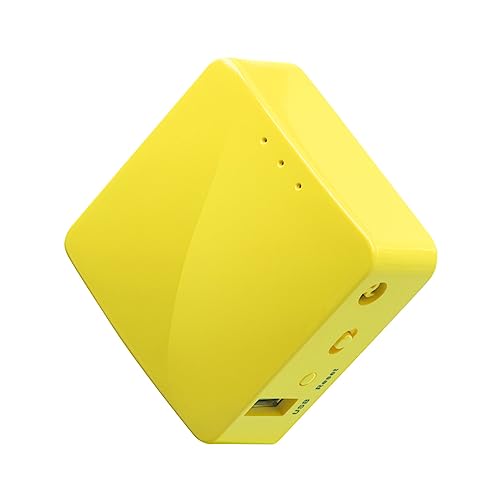 GL.iNet GL-MT300N-V2 (Mango) |
8.6/10 | Buy |
 TP-Link AC1200 Gigabit Dual Band WiFi Router |
8.4/10 | Buy | |
 TP-Link WiFi Travel Router (WiFi 5) |
7.8/10 | Buy |
Questions to Ask Before Buying
Does a pay-as-you-go Wi-Fi router include internet service?
No, these listings describe routers, not a bundled internet plan. The home models connect to a separate modem or gateway, while travel models need an available wired or wireless network, so confirm how you’ll get internet access.
Can the NETGEAR Nighthawk R6700AX work with my existing modem?
Yes, its listing says it connects to an existing modem or gateway by Ethernet and is compatible with most cable, fiber, DSL and satellite providers. Check your ISP and modem details, since some gateway combinations may need bridge mode.
Which listed router is designed for travel?
The GL.iNet Mango and TP-Link WiFi Travel Router are portable options. Mango can convert a public wired or wireless network into private Wi-Fi and is 2.4 GHz only; TP-Link offers multiple modes and dual-band Wi-Fi 5.
Does the GL.iNet Mango support both 2.4 GHz and 5 GHz?
No, the supplied listing specifies 2.4 GHz only. That matters if your devices or preferred network setup require the 5 GHz band, so check device compatibility and the available connection before choosing this travel router.
Do the TP-Link AC1200 and NETGEAR models include a modem?
No, their listings describe Wi-Fi routers that connect to a separate modem or gateway. Confirm your cable, fiber or DSL equipment and ISP requirements, and check whether your existing gateway needs a specific configuration.
About the author

Sofia Vasquez is a product writer covering mesh Wi-Fi routers and whole-home wireless networking. Sofia focuses on turning specification sheets and published test data into clear comparisons that help readers match a product to their budget and needs.